 arc53-machine
25c82003d7
arc53-machine
25c82003d7
Correctness
- /api/remote never recorded source.created, so URL, GitHub and connector
  sources had a source.deleted with no matching creation. All three creation
  paths now go through one _audit_source_created helper.
- The prompt-cache rate divided cached tokens by a whole bucket's prompt
  tokens. A bucket is a day and mixes calls whose provider reports a cache
  breakdown with calls whose provider does not, so filtering buckets in the
  client could not separate them and the rate was understated by however much
  traffic ran on a non-reporting provider. The denominator is now computed in
  SQL over the reporting rows.
- The outcome pill matched values nothing writes. Guardrails emit triggered /
  not_evaluated and the device feed emits dispatched; the map had blocked /
  denied / allowed, so a guardrail that fired rendered neutral grey -- the one
  signal the merged feed exists to surface. Fixtures were seeding the
  fictional values, so the tests passed on it too.
- Stream duration_ms timed the consumer. stream_token_usage is a generator,
  so start-to-exhaustion includes the agent loop's tool handling and the SSE
  client's pace; a slow browser recorded ~30s for a sub-second call. It now
  accumulates only the time spent inside next().

Safety
- Activity filters failed open: an unknown facet or unparseable timestamp was
  dropped, and no filter means every row, so a typo widened an audit view and
  on the export streamed the full history. Both are now a 400.
- The search term was interpolated into an ILIKE pattern, so "100%" matched
  everything and "q1_report" matched more than it should. Escaped.
- 0034 set actor_id NOT NULL with no default. A previous-release process
  inserting mid-rollout would raise, and in admin/routes.py that insert shares
  the request transaction, so a role grant beside it would roll back too.

Noise and dead code
- The per-user panel is a security panel: data-plane events file under the
  actor, so an active account's routine deletes pushed a denied login out of
  the 20-row window. It now excludes them; the Activity tab shows everything.
- device_audit_log had no created_at-leading index, so the merged feed
  sequentially scanned that branch every page (migration 0036).
- conversation.deleted_all no longer records when nothing was deleted, and
  agent.updated no longer records an empty field list.
- Dropped by_model from /admin/usage (no consumer; an extra aggregate per page
  load), the duplicate filter surface on AuthEventsRepository that nothing
  called, and the unreachable FLOW_LABELS.schedule entry.
- Type hints on record_event's conn and the remaining unannotated helpers.
DocsGPT 🦖
Private AI for agents, assistants and enterprise search
DocsGPT is an open-source AI platform for building intelligent agents and assistants. Features Agent Builder, deep research tools, document analysis (PDF, Office, web content, and audio), Multi-model support (choose your provider or run locally), and rich API connectivity for agents with actionable tools and integrations. Deploy anywhere with complete privacy control.



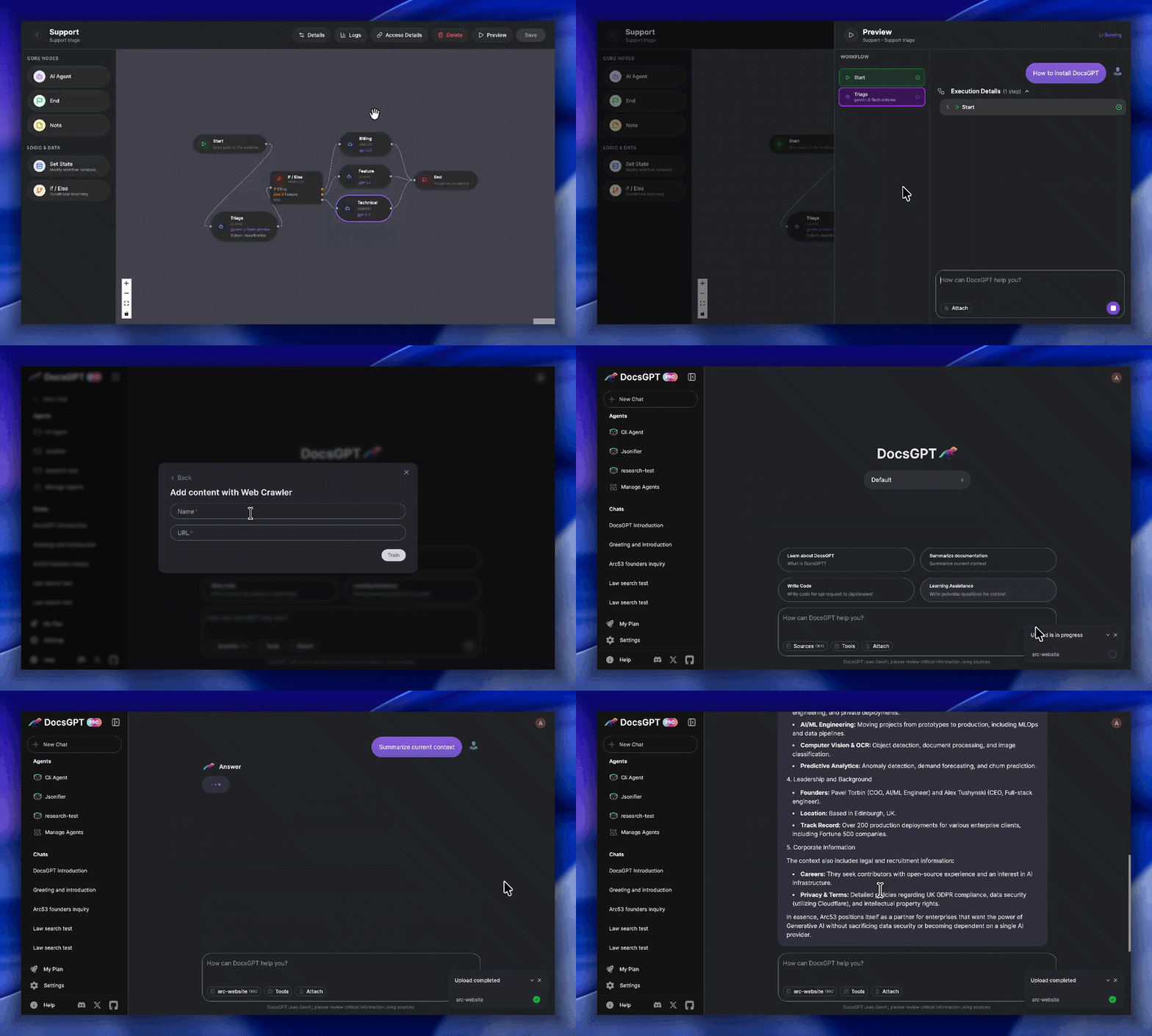
Key Features:
- 🗂️ Wide Format Support: Reads PDF, DOCX, CSV, XLSX, EPUB, MD, RST, HTML, MDX, JSON, PPTX, images, and audio files such as MP3, WAV, M4A, OGG, and WebM.
- 🎙️ Speech Workflows: Record voice input into chat, transcribe audio on the backend, and ingest meeting recordings or voice notes as searchable knowledge.
- 🌐 Web & Data Integration: Ingests from URLs, sitemaps, Reddit, GitHub and web crawlers.
- ✅ Reliable Answers: Get accurate, hallucination-free responses with source citations viewable in a clean UI.
- 🔑 Streamlined API Keys: Generate keys linked to your settings, documents, and models, simplifying chatbot and integration setup.
- 🔗 Actionable Tooling: Connect to APIs, tools, and other services to enable LLM actions.
- 🧩 Pre-built Integrations: Use readily available HTML/React chat widgets, search tools, Discord/Telegram bots, and more.
- 🔌 Flexible Deployment: Works with major LLMs (OpenAI, Google, Anthropic) and local models (Ollama, llama_cpp).
- 🏢 Secure & Scalable: Run privately and securely with Kubernetes support, designed for enterprise-grade reliability.
Roadmap
- Agent Workflow Builder with conditional nodes ( February 2026 )
- Research mode ( March 2026 )
- SharePoint & Confluence connectors ( March – April 2026 )
- Postgres migration for user data ( April 2026 )
- OpenTelemetry observability ( April 2026 )
- Bring Your Own Model (BYOM) ( April 2026 )
- Agent scheduling (RedBeat-backed) ( April 2026 )
- Notifications & conversation search ( May 2026 )
- Analytics & logs revamp with per-agent attribution ( June 2026 )
- OIDC / SSO login with SCIM provisioning & groups ( June 2026 )
- Admin dashboard & role-based access control (RBAC) ( June 2026 )
- Agent import / export ( June 2026 )
- Teams with team-scoped sharing & roles ( June 2026 )
You can find our full roadmap here. Please don't hesitate to contribute or create issues, it helps us improve DocsGPT!
Production Support / Help for Companies:
We're eager to provide personalized assistance when deploying your DocsGPT to a live environment.
Join the Lighthouse Program 🌟
Calling all developers and GenAI innovators! The DocsGPT Lighthouse Program connects technical leaders actively deploying or extending DocsGPT in real-world scenarios. Collaborate directly with our team to shape the roadmap, access priority support, and build enterprise-ready solutions with exclusive community insights.
QuickStart
Note
DocsGPT runs on Docker. The installer checks for it first.
macOS and Linux:
curl -fsSL https://docs.ac/install | bash
Windows (PowerShell):
irm https://docs.ac/install.ps1 | iex
The installer gets uv, installs the docsgpt Python package with it, and runs docsgpt up. That asks who should reach DocsGPT (only this computer, your network, or a domain with HTTPS) and which model provider to use, then starts it, at http://localhost:7091 for a local install. Afterwards, docsgpt status, docsgpt logs, docsgpt upgrade, docsgpt down and docsgpt uninstall manage it.
To read the script before running it:
curl -fsSL https://docs.ac/install -o install.sh
less install.sh
bash install.sh
A more detailed Quickstart is available in our documentation.
From a clone, with the setup script
-
Clone the repository:
git clone https://github.com/arc53/DocsGPT.git
cd DocsGPT
For macOS and Linux:
-
Run the setup script:
./setup.sh
For Windows:
-
Run the PowerShell setup script:
PowerShell -ExecutionPolicy Bypass -File .\setup.ps1
Either script will guide you through setting up DocsGPT. Five options are available: using the public API, running locally, connecting to a local inference engine, using a cloud API provider, or building the docker image locally. The scripts will automatically configure your .env file and handle necessary downloads and installations based on your chosen option.
Navigate to http://localhost:5173/
To stop DocsGPT, open a terminal in the DocsGPT directory and run:
docker compose -f deployment/docker-compose.yaml down
(or use the specific docker compose down command shown after running the setup script).
Note
For development environment setup instructions, please refer to the Development Environment Guide.
Contributing
Please refer to the CONTRIBUTING.md file for information about how to get involved. We welcome issues, questions, and pull requests.
Architecture
Project Structure
-
docsgpt - Backend Flask application (the
docsgptPython package). -
Extensions - Integrations and widgets (e.g., Chatwoot, React widget).
-
Scripts - Miscellaneous utility scripts.
Code Of Conduct
We as members, contributors, and leaders, pledge to make participation in our community a harassment-free experience for everyone, regardless of age, body size, visible or invisible disability, ethnicity, sex characteristics, gender identity and expression, level of experience, education, socio-economic status, nationality, personal appearance, race, religion, or sexual identity and orientation. Please refer to the CODE_OF_CONDUCT.md file for more information about contributing.
Many Thanks To Our Contributors⚡
License
The source code license is MIT, as described in the LICENSE file.
This project is supported by:
